Our flagship 100% browser-based workforce management engine. Runs seamlessly in any browserβwhether deployed on our central high-availability Cloud-First SaaS or on an on-site Local-First Sabre Node. Connect hardware-agnostic biometric clocks, automate bargaining union shift rules, trigger real-time WhatsApp alerts, and export SARS-compliant payroll data effortlessly.
Everything you need from biometric clock-in to SARS-compliant payslip export.
Our Algorithm Conversion Engine standardizes biometric data across ZKTeco, Dahua, and Hikvision seamlessly. Enroll on one device, sync to all.
Don't want to assign static shift rosters? Our engine automatically detects exactly which shift an employee worked based on punch timestamps.
Configure dynamic daily, weekly, or 45-hour monthly overtime limits directly. Full support for Normal, OT1.5, OT2.0, and Short Time buckets.
Manage Annual, Sick, and Family Responsibility leave directly inside the platform. Approved leaves instantly generate paid hours.
Turn your attendance clocks into smart security doors. Assign employees to precise Access Zones and prevent unauthorized movement.
Offline-first mobile Progressive Web App with facial recognition, QR code scan, NFC card tap, fingerprint, and supervisor Roll Call modes.
Centralized corporate dashboard across unlimited locations, branches, mines, farms, and manufacturing plants over WAN/Internet.
Notify managers and supervisors instantly when employees clock late, absent, or attempt unauthorized door access.
One-click export files for Sage VIP Classic/Premier, Pastel Payroll, Payday, DrSmash, AccSys, and banking EFT integration.
Both options deliver our 100% web-based workforce application (Sabre Browser). Choose between our recommended central Cloud SaaS infrastructure or an on-site local Sabre Node.
Access Sabre Browser centrally hosted in high-availability cloud data centers. Built using latest web standards, requiring zero local server management.
Biometric hardware (ZKTeco, Hikvision, etc.) stores all attendance logs locally in device memory during internet outages. As soon as connectivity restores, hardware automatically re-syncs all cached punch data to the cloud backend with zero data loss!
Runs the Sabre Browser engine locally on an on-site server/PC. Designed for high-security facilities or single sites needing local offline web access.
sr-100030.sabre.localhost:1005).Whenever an internet connection is available, the local node automatically runs encrypted background cloud backups (Sabre Second Copy) to push data snapshots to the cloud for offsite disaster recovery and multi-site organization syncing.
Watch our deep-dives into biometric pipelines, hardware modularity, and workforce automation.
Learn how Sabre Browser delivers cloud workforce management, multi-branch attendance tracking, and SARS-compliant payroll processing.
A detailed walkthrough of our hardware-agnostic modular access control stack for residential and enterprise deployments.
Dive deep into our Algorithm Conversion Engine (ACE), template synchronization, and high-security anti-passback controls.
Download our architecture overview guides, features manuals, and API documentation.
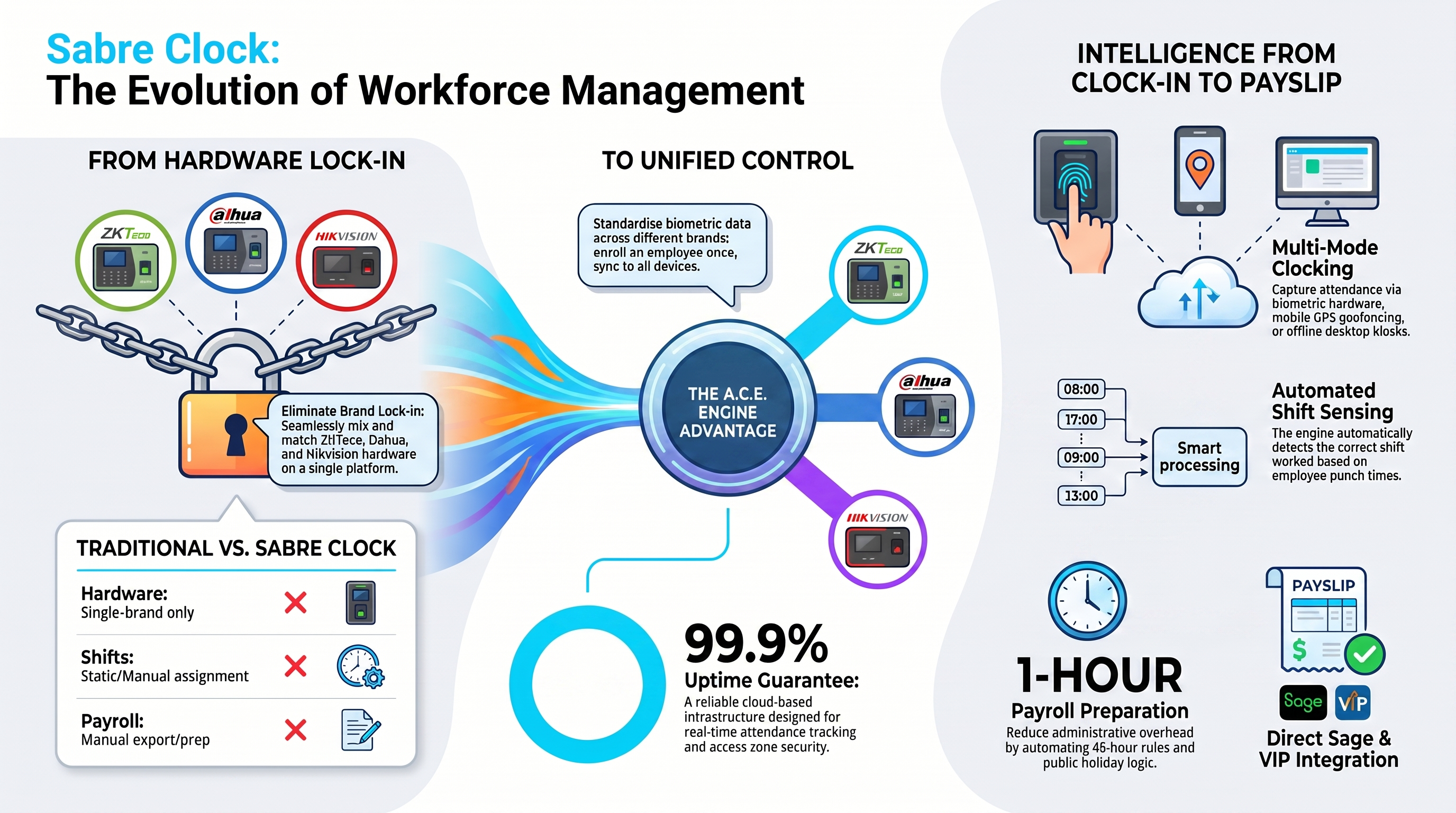
Architectural overview mapping out ZKTeco, Dahua, and Hikvision hardware integration via ACE.
Download Overview InfographicComprehensive system user manual and setup guide.
Detailed features overview brochure.
Integrator manual for developers and ERP setups.
Everything you need to configure your hardware devices, train your team, access user manuals, and resolve technical issues.
Point your ZKTeco biometric time-attendance terminals, facial recognition devices, or access control hardware directly to the Sabre Cloud Platform without any on-premise middleware or local servers.
| Setting Parameter | Value / Setting |
|---|---|
| Server Domain Name | clock.sabreproducts.com |
| Enable Domain Name | ON / Enabled |
| Server Port | 80 (HTTP) or 443 (HTTPS) |
| Web Path / Target URL | /iclock/ (Default Push Path) |
| Communication Protocol | ADMS / Push SDK |
1005), our support team can provide a direct static server IP address privately.
M/OK on your ZKTeco terminal and enter System Administrator credentials.Comm. → Cloud Server Setting (or ADMS / Webserver Setting depending on firmware).Enable Domain Name to ON.clock.sabreproducts.com and Server Port to 80.Watch step-by-step video guides covering initial system setup, employee management, shift scheduling, and reporting.
Browse our complete matrix of compatible ZKTeco biometric time clocks, facial recognition readers, turnstiles, and mobile PWA clocking options.
Download official product brochures, user administration manuals, and API integration specifications for developers.
View All DownloadsHave questions or need assistance with custom firewall configurations? Our local South African support engineering team is here to help.
No hidden catches. Pay only for active employees or residential users.
Deliver Sabre Cloud SaaS under your own brand identity with custom white-label login portals, wholesale pricing, and bundled hardware margins.